
A simple power reset will usually stop your kitchenaid dishwasher clean light blinking, as this indicator often signals a temporary glitch in the control board’s communication. Most users find that disconnecting the unit from its power source for at least one minute clears the error code. If the light continues to flash after you restore power, it typically means the machine has detected a specific internal fault, such as a heating element failure or a sensor error, that requires a more precise diagnostic approach.
Reasons your dishwasher clean light blinks
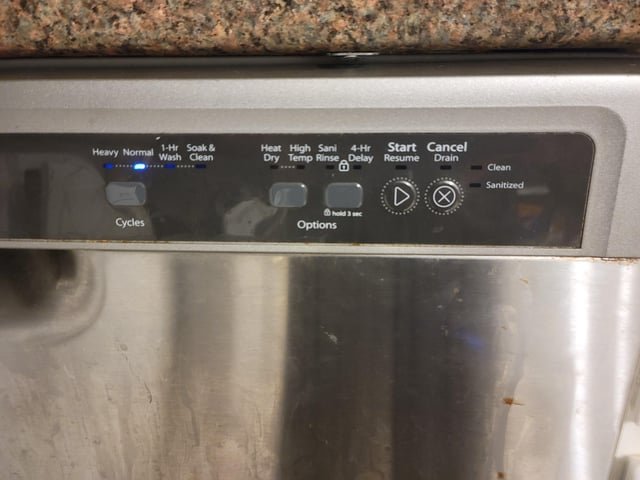
The blinking light serves as a diagnostic tool for the dishwasher’s control board. When the board detects an abnormal condition during a cycle, it stops the process and alerts you through the flashing indicator. This isn’t a random glitch; it’s a programmed safety feature designed to protect the internal components.
The most common cause is a heating issue. If the water fails to reach the required temperature within the allotted time, the control board halts the cycle to prevent poor cleaning performance. Another frequent reason is a sensor disagreement. If the water level or turbidity sensor provides data that contradicts the expected cycle status, the system defaults to the blinking light to prevent potential flooding or overheating.
You should also check for a thermal fuse issue. The KitchenAid official product support page explains how these diagnostic codes serve as a direct communication line between the internal sensors and the user interface. If the control board loses connection with a heating sensor or if the door latch switch fails, the software will trigger the flash as a fail-safe. This varies by model—check the label on your door edge for the specific series number, as newer electronic models use different error patterns than older mechanical-hybrid versions. Never attempt to test or replace internal electrical components yourself, as a capacitor can hold a lethal charge even when the unit is unplugged.
Perform a hard power reset
If you’re dealing with a one-time software error, a hard reset is the first step. This process forces the control board to dump its volatile memory and restart its firmware. This is for users who have just experienced a power surge or a sudden cycle interruption.
To perform the reset, locate the circuit breaker for your dishwasher in your home’s main electrical panel. Switch the breaker to the “Off” position. Leave it off for at least one minute to ensure the control board resets. After the time has passed, flip the breaker back to the “On” position. Once the power is restored, look at the control panel. If the light stops blinking, run a short “Rinse Only” cycle to verify that the board can successfully communicate with the pumps and valves again.
If the light returns immediately, don’t keep trying to reset it. This indicates a physical component failure, such as a bad heating element or a faulty control board, which won’t resolve through power cycling. If you aren’t comfortable working with your home’s breaker panel, or if the panel is old and stiff, contact a licensed electrician to avoid injury. This fix isn’t for those who have a persistent leak or visible wiring damage, as electrical shorts require a professional technician to ensure the machine remains safe to operate.
Check the door latch assembly
Sometimes the blinking light isn’t an electronic error but a physical one. If the door latch doesn’t click firmly into place, the dishwasher assumes the door is open and stops the cycle. This is a common mistake; many people push the door shut without ensuring the latch has fully engaged the strike plate.
Inspect the latch mechanism on the top center of the door and the corresponding strike plate on the tub frame. Look for food debris, hardened soap, or loose screws that might prevent the latch from closing completely. If the latch feels “mushy” or fails to make an audible click, the switch inside the assembly may be failing to send a “closed” signal to the board.
If you find debris, use a damp cloth to wipe the area clean, but never use harsh chemicals or metal tools that could scratch the plastic or damage the seal. If the latch is loose, tighten the screws on the inside of the door frame using a manual screwdriver. Don’t use a power drill, as you may crack the plastic housing. If you tighten the screws and the light still blinks, you likely have a faulty door switch. This is a trade-off: you can attempt to clean it yourself, but internal switch replacement is a job for a qualified appliance technician.
Verify heating element continuity
For persistent blinking that happens only after the wash cycle starts, the heating element may be broken. This fix is for those who are confident in their basic mechanical skills, but it carries a risk of voiding your warranty if you aren’t careful.
The dishwasher heats water to sanitize dishes; if the element is broken, the computer detects the low temperature and stops the cycle. To check this, open the dishwasher and look at the bottom of the tub. The heating element is the large, U-shaped metal loop. Look for visible signs of damage, such as cracks, burns, or black spots on the metal. If you see these, the element is burnt out and needs replacing.
If the element looks fine but the light still blinks, the issue might be the thermistor (the temperature sensor). This is a tiny component located near the heating element. If you have no experience with appliance repair, stop here. A technician can use a multimeter to check the resistance of these parts to see if they’re actually dead. Don’t attempt to open the control housing or probe the wiring yourself. If you aren’t sure how to safely verify continuity, call a professional. It’s better to pay for a service call than to risk a fire hazard from an improper repair or a damaged wire.
What not to do
- Don’t press every button on the panel at once. This can trigger a “Service Mode” or “Factory Test” that may lock your controls or erase stored cycles, making the problem harder to fix.
- Don’t force the door shut with excessive pressure. If the latch isn’t catching, pushing harder will likely snap the plastic handle or break the door hinge, which costs significantly more to repair than a simple switch.
- Don’t use a hair dryer or heat gun to “dry out” the inside. This will melt the plastic components and damage the door seal, leading to permanent leaks that will ruin your floor.
- Don’t attempt to bypass the door switch with a paperclip or tape. This removes a vital safety interlock, allowing the machine to spray hot, soapy water while the door is open, which poses a severe burn risk to you and anyone nearby.
How to stop it happening again
Preventing this issue requires keeping the sensors and mechanical parts clean. Most errors start when the machine struggles to do its job, often because debris interferes with internal feedback loops.
| If you’re doing this | Do this instead | Why |
|---|---|---|
| Overloading the rack | Space dishes properly | Allows water to reach sensors |
| Using cheap detergent | Use recommended brands | Prevents soap buildup on sensors |
| Closing door slowly | Use a firm, steady push | Ensures the latch engages fully |
The most common mistake is waiting for a visible error code before cleaning the filter. This delay forces the pump to work against resistance, which can overheat the motor. If your machine makes a high-pitched whine during the rinse cycle, check the filter immediately. If the sound persists after cleaning, the pump motor bearings may be failing. A clean machine should run quietly; any grinding noise is a signal to stop and inspect the pump and impeller for debris.
Frequently asked questions
Can I run my dishwasher if the light is blinking?
No, you shouldn’t run the machine while the clean light is blinking. This light indicates the control board has detected a fault and entered a protective state. Running the machine in this condition may cause it to overflow, fail to heat water, or overheat the motor. Always address the underlying cause before attempting a cycle to avoid further damage.
How long should I leave the dishwasher unplugged?
You should leave the dishwasher unplugged or the circuit breaker off for at least one minute to ensure a full reset. This time allows the capacitors on the control board to discharge their stored energy completely. If you flip the power back on too quickly, the board may retain the error code in its memory, and the light will simply resume blinking as if no reset occurred.
Is it safe to use the dishwasher if the blinking stops?
Yes, if the light stops blinking after a reset and the machine completes a cycle without the light returning, it’s safe to use. However, if the light returns during the next wash, the component causing the error is still failing. Don’t ignore a recurring light, as it’s a sign that the machine is struggling to perform a critical task like heating or draining.
Why does my dishwasher blink only during the wash cycle?
The dishwasher blinks during the wash cycle because that’s when the control board actively monitors the water temperature and pressure. If the heating element fails to raise the water temperature to the target level within the allowed time, the board registers a “Heat Error.” It only knows the element is broken when it tries to turn it on and receives no confirmation that the water is actually getting hot.
What happens if I ignore the blinking light?
If you ignore the blinking light, the dishwasher will eventually stop working entirely. The control board will continue to log errors until it locks the system to prevent a fire or flood. Furthermore, your dishes won’t be sanitized properly if the water doesn’t reach the correct temperature, which can lead to bacteria growth inside the machine. Proper maintenance is always cheaper than replacing a control board or a pump.
Final Thoughts
If the flashing persists despite your efforts, it’s best to check your owner’s manual for the specific blink pattern, which acts as a diagnostic code. Don’t hesitate to reach out to a professional technician if you’re unsure about the repair, as they’ll have the right tools to get your appliance running smoothly again.