
If your Apple Watch not recording sleep is a concern, check that Sleep Focus is active during your scheduled bedtime. Confirm this by opening the Control Center; the bed icon should be highlighted. If settings are correct, ensure your device has at least 30% charge to track a full night.
| Cause | How common | How to confirm it | Fix it yourself? |
|---|---|---|---|
| Sleep Focus off | Very common | Check for bed icon | Yes |
| Battery below 30% | Common | Check battery percentage | Yes |
| Wrist detection off | Occasional | Settings, Passcode menu | Yes |
| Loose watch band | Occasional | Check sensor contact | Yes |
| Software outdated | Rare | Check system updates | Yes |
| Hardware failure | Very rare | Contact Apple Support | No |
How to schedule sleep recording
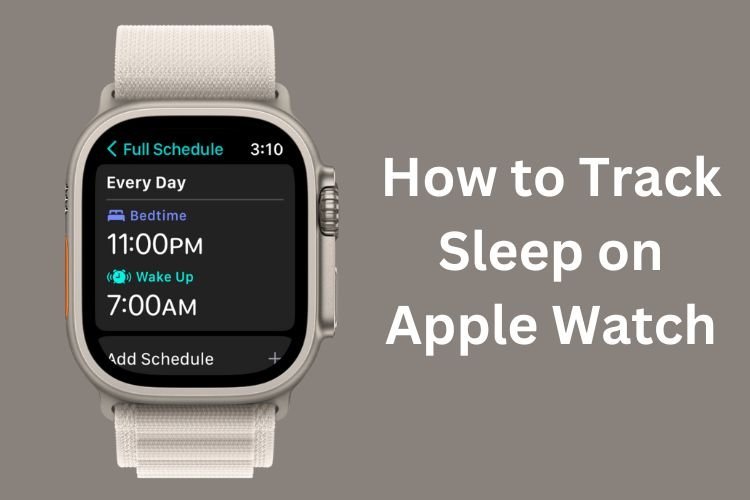
The Sleep Focus is the primary tool your device uses to determine when to start tracking. When this feature is off, the watch assumes you’re still awake and doesn’t trigger the sensors needed for sleep analysis. You can confirm your current schedule by opening the Health app on your iPhone, tapping the Browse tab, and selecting Sleep to view your active schedule.
To ensure tracking works, you must set a specific bedtime and wake-up time in the Sleep app on your watch or the Health app on your phone. If you go to bed earlier than your scheduled time, the watch might not record the initial phase of your sleep unless you manually turn on the Sleep Focus from the Control Center. If you have a variable schedule, you’ll need to adjust the days and times manually each week. This varies by model — check the label or the official Apple Watch user guide to confirm if your specific watchOS version supports automatic sleep detection without a set schedule. If you find that the watch records sleep when you’re sitting still, but not when you’re lying down, the sensor might be failing to detect your heart rate correctly. This happens because the watch relies on consistent skin contact to differentiate between resting and sleeping. If the device doesn’t detect your heart rate for more than 10 minutes, it will stop recording, which costs you the data for the remainder of the night.
Battery and power management
Your watch must have enough energy to monitor your heart rate and movement throughout the entire night. If your battery level drops below 30% before you go to bed, the watch won’t start a new sleep tracking session to save power for the next morning. This is a deliberate design choice to ensure you have enough battery left to use your watch when you wake up.
If your watch often ends the day with low power, try charging it for 30 to 60 minutes in the evening before you put it on for the night. This ensures the battery stays above the threshold required for tracking. A common mistake is leaving the watch on a high-power setting, such as Always-On display, which drains the battery faster than the device can recover during the day. If you notice the watch consistently dies during the night, it might be time to replace the battery or upgrade the device. This is a trade-off: you gain better data by leaving features on, but you lose battery life. If you don’t want to charge it regularly, turn off the Always-On display before bed. If the battery is healthy but still fails to record, check the health settings in the iPhone Watch app to ensure the “Track Sleep with Apple Watch” toggle is still switched to the on position.
Sensor contact and wrist fit
The watch sensors need direct contact with your skin to track your vital signs accurately. If the band is too loose, the watch will move around on your wrist, causing the sensors to lose contact with your skin. This causes the watch to stop recording because it can’t detect a pulse. To test this, slide the watch up your arm; if it moves easily or rotates around your wrist, it’s too loose.
You should tighten the band by one hole or adjust the clasp so the watch sits snugly against your skin, but not so tight that it feels uncomfortable. This is especially important for people with smaller wrists or those who use silicone bands that can stretch over time. If you have a medical condition that requires a very precise fit, you might need a different style of band, such as a sport loop, which offers more precise adjustments than a standard buckle. This isn’t for people who prefer a loose, dangling fit; if you refuse to wear the watch snugly, the data will remain incomplete. If you have confirmed the fit is correct and the watch is still not recording, the issue might be a software bug. In that case, restart both your watch and your paired iPhone. This clears temporary background processes that might be blocking the sensor data from syncing to the Health app.
The less likely causes
Wrist detection is turned off in your passcode settings, preventing the watch from knowing it’s being worn. Check this by opening the Watch app on your iPhone, tapping Passcode, and ensuring the toggle is green.
The watch is currently in Power Reserve mode, which shuts down all non-essential features, including sleep tracking. If you see only the time in green text, you’re in this mode. You must restart the device to restore full functionality.
Your software is outdated, meaning the watch can’t communicate properly with the Health app. If your watchOS version is older than 9.0, sleep tracking will fail to sync.
There’s a physical obstruction on the back of the watch, such as dirt or debris, blocking the optical sensors. Wipe the sensor array with a lint-free cloth. If the sensors are damaged from a drop or water exposure, contact a professional repair shop, as this isn’t a DIY fix.
What a fix usually involves
Most fixes for sleep tracking issues involve simple software adjustments that require only a few minutes of your time. If the issue is related to your settings, you can correct it by navigating through the menus in the Watch or Health app on your iPhone. These changes cost nothing and are part of the standard configuration. If the problem is a loose band, you might need to purchase a new one. A replacement band can range from a small part of your overall investment to a significant cost depending on the material and brand. You can check the official Apple website or authorized retailers to compare prices and ensure the fit is correct for your wrist size. If the issue is a faulty battery or a hardware sensor failure, the cost will be much higher, potentially reaching a large portion of the price of a new device. In these cases, it’s best to visit an Apple Store or an authorized service provider to get a real quote based on your specific model. Always check your warranty status first, as some hardware failures may be covered at no cost.
Frequently asked questions
Can I track sleep without a schedule?
No, the watch requires you to set up a sleep schedule in the Health app to reliably start the tracking process. While some newer versions have improved automatic detection, the most consistent results come from having a defined schedule. You can adjust this schedule at any time, but the watch needs that baseline to know when you intend to sleep.
Is it safe to wear my watch while sleeping?
Yes, it’s safe to wear your watch to bed, as the device is designed for 24-hour use. The watch uses low-energy light for its heart rate sensors, which poses no known risk to your skin or health. If you feel any irritation, check that the band is clean and dry before putting it on for the night.
How long does the battery last with sleep tracking?
About 18 to 24 hours is the typical lifespan for a fully charged watch, though this varies by model and usage. If you use your watch for sleep tracking, you should plan to charge it whenever you notice it running low. Most users find that charging while showering or getting ready in the morning provides enough power for the next 24 hours.
What happens if I move a lot during the night?
The watch will still record your sleep, but your data might show more periods of restlessness. The sensors are designed to distinguish between movement and sleep patterns, so the device will continue to log your rest unless the movement causes the watch to lose contact with your skin entirely. If the watch loses contact, it will simply show a gap in your sleep data.
Does it matter if I take the watch off for a few minutes?
Yes, taking the watch off for more than a few minutes during the night will interrupt the recording session. The sensors require a continuous stream of data to provide an accurate sleep analysis. If you remove the watch to use the restroom, it should resume tracking once you put it back on, provided the band is secure and the battery is sufficient.
Why is my Apple Watch not recording sleep?
The data might be missing because the watch failed to sync with your iPhone, or the sleep tracking feature wasn’t active. Check the Health app on your iPhone to see if the watch is listed under your data sources. If it is, try manually syncing the devices by opening the Watch app and ensuring your connection is stable.
Final Thoughts
If you still don’t see your data after checking these basics, try unpairing and re-pairing your watch with your iPhone. This often clears up minor software glitches that prevent sensors from syncing correctly. If you’re still having trouble tomorrow morning, it’s a good idea to contact Apple Support for further help.
Related guides