
You can fix an ikea remote control light not working by checking the battery levels and re-pairing the device to the light source. The most frequent cause is a dead battery inside the remote, which prevents the signal from reaching the bulb or driver. If the battery is fresh and the light still doesn’t respond, the connection between the remote and the light hardware has likely been lost. This is a common issue that happens after power cuts or when the remote is moved too far from the light.
Why your IKEA remote control light not working
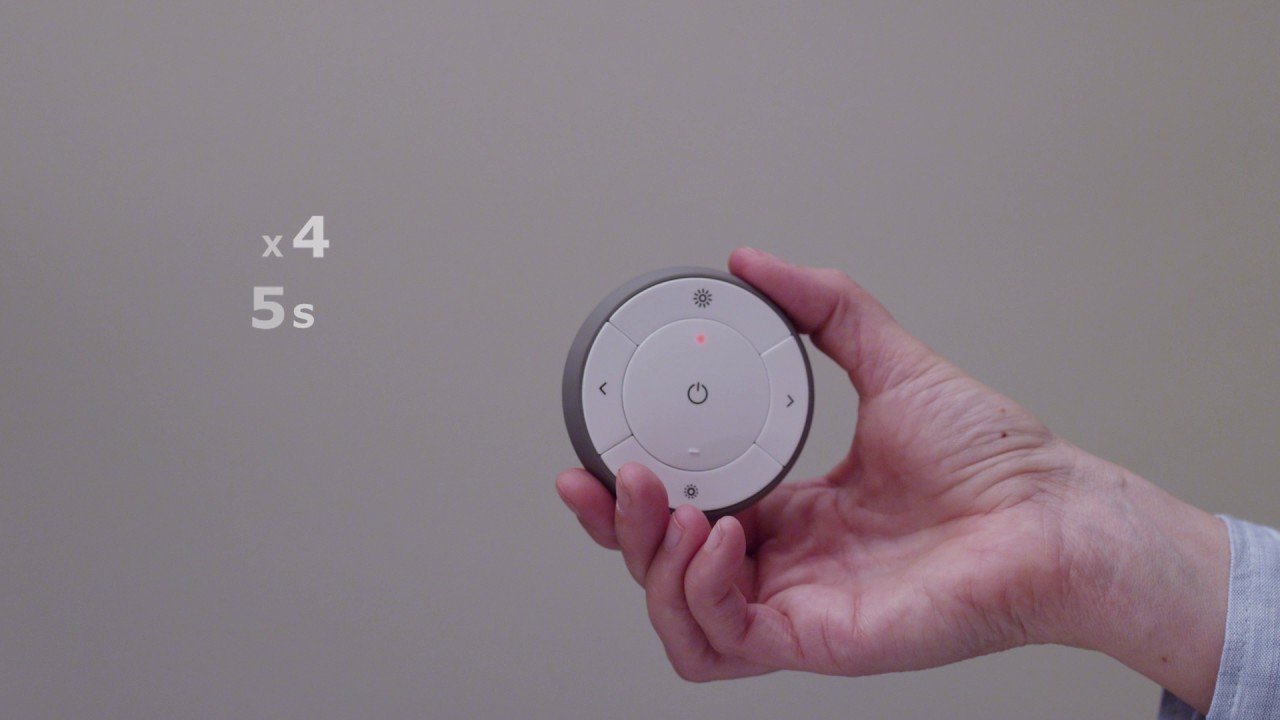
Lights controlled by these remotes rely on a wireless signal to communicate. When you press a button, the remote sends a command to the receiver inside the bulb or the light driver. If the remote is unresponsive, it’s usually because the battery voltage has dropped below the level required to transmit a signal. Even if a battery looks new, it may not have enough power to maintain a stable wireless connection.
Another common cause is the “pairing” state being lost. Every remote must be digitally linked to its specific light. If the light loses power for a long time—such as during a home electrical outage—the internal memory of the bulb may reset. When this happens, the light effectively “forgets” the remote, and the two devices no longer talk to each other.
Finally, physical distance and interference play a role. These remotes operate on a specific radio frequency. If you’re trying to control the light from another room, or if there are large metal objects between the remote and the light, the signal may be blocked. The IKEA support page for smart lighting explains that these devices have a maximum range, which usually sits around 30 feet in an open area. This varies by model—check the label on your specific remote to see if it requires a closer range for initial setup.
Change the batteries
If your remote is unresponsive, start by replacing the batteries with fresh ones of the exact type listed in your manual. Most IKEA smart remotes use a CR2032 coin cell battery. To do this, slide the battery cover off the back of the remote. Remove the old battery and insert the new one.
When you put the new battery in, ensure the positive side is facing the direction indicated on the battery compartment. If you see the LED light on the remote flash when you press a button, the remote has power. If the light still doesn’t work, the issue isn’t the power, but the pairing. This fix is for users who have confirmed the remote has no visible physical damage. If the battery compartment is corroded or the remote was dropped in water, it’s likely broken beyond repair and will need to be replaced. This isn’t for people who want to open the remote casing with tools, as doing so can damage the delicate internal antenna. If the remote still fails to communicate after a battery swap, move on to the pairing steps.
Pair the remote again
To re-pair your remote, you must bring it very close to the light source. Hold the remote within two inches of the bulb or the light driver you’re trying to control. Turn the main power switch for the light off and on six times. This action signals to the light that it should enter “pairing mode.” You’ll know it has worked when the light begins to pulse or dim slightly.
Once the light pulses, press and hold the pairing button on your remote for ten seconds. The remote should then begin to communicate with the light. You’ll see the light pulse again or flash to confirm that it has accepted the signal from the remote. If you have multiple lights, you must repeat this process for each one. This assumes you’re using a standard setup; if you have a complex system with a hub or gateway, you may need to use the IKEA Home smart app to complete the pairing. If the light doesn’t pulse after six power cycles, it means the light bulb itself may be faulty. In that case, try the bulb in a different lamp socket to rule out an issue with your home wiring.
Perform a factory reset
If the remote is powered and the pairing process doesn’t work, you may need to reset both the remote and the light to their original settings. A factory reset clears out all previous connection data. This is worth the effort if you have tried everything else and the light remains unresponsive. To reset the remote, locate the small pairing button on the back or inside the battery compartment. Press this button four times quickly, then hold it down for a fifth time until the light on the remote flashes.
To reset the light, follow the same power-cycling steps you used for pairing, but do it more slowly. Turn the light off and on six times. This is a more aggressive reset and should clear the memory of the light. After both devices are reset, try the pairing process again from the beginning. If the light still doesn’t respond after a full reset, the internal receiver in the bulb or the driver is likely defective. This is where you must stop, as the internal components aren’t user-serviceable. If you’re still under warranty, contact IKEA support for a replacement unit. Don’t attempt to take the light housing apart, as this creates a risk of electric shock and voids your warranty.
What not to do
- Don’t use a screwdriver to force the battery cover open, as this often snaps the plastic tabs and makes the remote impossible to close securely.
- Don’t leave the light switch turned off for several days if you think the pairing is lost, because the light needs to be powered to receive the reset command.
- Don’t attempt to solder or modify the internal antenna of the remote, as this will permanently disable the wireless signal and destroy the device.
- Don’t assume the light is broken just because it doesn’t respond once; always try the pairing sequence at least twice before deciding the hardware has failed.
How to stop it happening again
Consistency is the best way to keep your smart lighting working correctly. If you’re doing this, do this instead:
| If you’re doing this | Do this instead | Why |
|---|---|---|
| Leaving lights off at the wall | Use the remote only | Keeps the receiver ready |
| Mixing old and new batteries | Use only fresh batteries | Prevents voltage drops |
| Keeping remote far away | Keep it near the bulb | Ensures signal strength |
| Ignoring weak flashes | Change batteries now | Stops total connection loss |
Most users make the mistake of waiting until the light fails entirely before swapping batteries.
Use this simple decision rule to save time. If the bulb flickers or dims during a command, replace the power source immediately. If the bulb remains unresponsive after a fresh battery swap, perform a power cycle by flipping the wall switch off for ten seconds.
Frequently asked questions
Can I use any remote with my light?
No, you must use a remote compatible with your specific light series. IKEA smart lighting uses a proprietary protocol, meaning remotes from other brands won’t work. Verify compatibility by checking the model number against the official product packaging or the IKEA website.
Why does my light flash randomly?
Your light is likely flashing because it’s searching for a paired device or experiencing signal interference. Moving the remote closer to the light often stabilizes the connection. If the flashing persists, turn the power off at the wall for one minute to clear the memory.
How long do the remote batteries last?
Batteries in these remotes typically last between six and twelve months depending on usage frequency. Daily dimming drains the battery faster than simple on and off commands. If you notice the range decreasing, replace the battery immediately to prevent a total loss of connection.
Is it safe to reset my lights?
Yes, it’s safe to perform a factory reset on your lights by following the manufacturer’s instructions. This process only clears digital pairing data and poses no risk to your electrical system. Ensure your hands are dry before touching the switch or remote.
What happens if I lose my remote?
If you lose your remote, you’ll be unable to control the smart features of your light. You can purchase a replacement from IKEA and pair it to your existing lights using this guide. Note that using a standard light switch will only provide basic on and off functionality.
Final Thoughts
If these simple adjustments don’t get your room glowing again, it’s worth checking the IKEA Home smart app for any pending firmware updates. Sometimes, a quick software refresh is all your device needs to stay connected. Don’t hesitate to reach out to their support team if you’re still having trouble.
Related guides


