
A TCL TV light blinking usually signals that the television’s internal software has encountered a startup error or that a hardware component is failing to initialize. You should immediately unplug the power cord and wait at least 60 seconds before plugging it back in to attempt a power reset. This simple action often clears temporary glitches in the control board’s memory.
How to fix a TCL TV light blinking
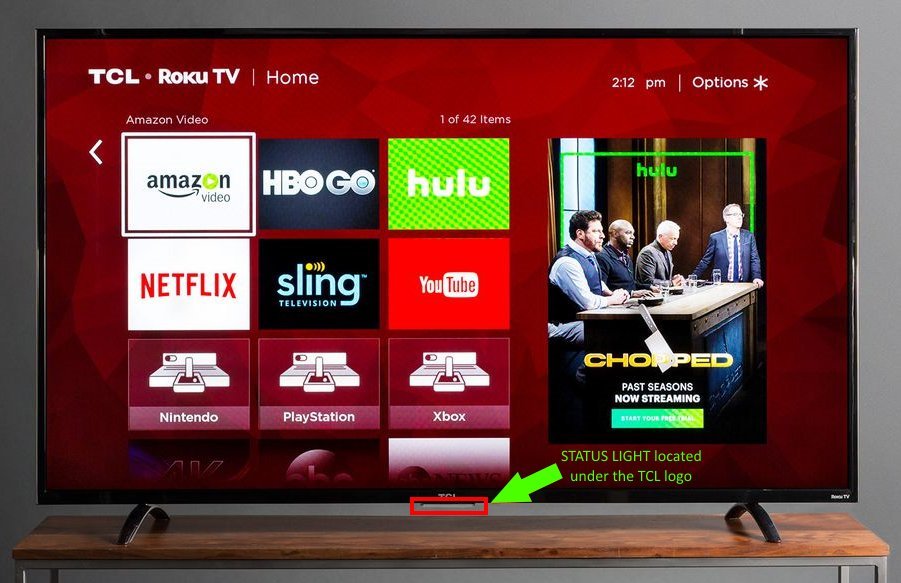
Unplug the power cable from the wall outlet. Don’t simply turn off the device with the remote, as the standby mode keeps the internal capacitors charged.
Press and hold the physical power button on the TV chassis for 30 seconds to drain residual energy. This hard reset clears the volatile memory that often traps software glitches.
Disconnect all external devices, including HDMI cables, USB drives, and soundbars, to isolate the TV’s own system. A faulty peripheral can trigger a protection mode that prevents the screen from waking.
Plug the power cable directly into a wall outlet, avoiding any power strips or surge protectors, to verify if the issue is a voltage drop.
Watch the status light. If it continues to blink, count the number of flashes in the sequence before it pauses. This pattern indicates a specific error code unique to your model’s firmware. If the light remains solid, the issue is likely the backlight rather than the mainboard.
What is actually happening
When your screen remains dark while the indicator light flashes, the TV is stuck in a “boot loop” or a self-protection mode. The main board runs a diagnostic check every time it receives power. If it detects that the backlight, the power supply unit, or the T-con board can’t provide the correct voltage, it halts the startup process to prevent further damage. The blinking light is the system’s way of communicating a fault code.
Most common issues involve the power supply board failing to provide steady voltage to the main processor. If you have recently moved the TV or had a power surge, a loose ribbon cable connection inside the casing can also cause the system to fail this initial handshake. These diagnostic lights are programmed to blink in specific intervals to help identify which circuit is failing to report back.
If you suspect a loose cable, unplug the unit for ten minutes before opening the chassis. Pressing down firmly on the ribbon connectors to reseat them often resolves the issue if the TV was recently bumped. However, don’t touch the large capacitors on the power board, as they can hold a lethal charge even when unplugged for hours.
This varies by model. Check the label on the back of your television for the specific version number, as the meaning of a “three-blink” code on one unit may differ entirely from another. If you hear a faint clicking sound alongside the blinking, this often points to a failing relay on the power board. If the light is solid but the screen is black, the problem is likely the backlight array rather than the main board. Always verify these conditions against the manual for your specific series, as the blinking rhythm is the only way to know if the fault is localized to the power supply or the display panel itself.
Check these, cheapest first
Check the wall outlet
Plug a lamp into the same outlet to ensure it provides steady power. If the lamp flickers or fails, your outlet is the problem.
Inspect HDMI cables
Remove every cable from the ports. A short circuit in a damaged HDMI cable can prevent a TV from finishing its startup sequence.
Reset the remote
Remove the batteries from your remote and try starting the TV using the physical button on the frame. Sometimes, a stuck button on the remote sends a constant signal that confuses the TV.
Verify the power cable
Check the power cord for any signs of fraying or heat damage. Ensure the connection at the back of the TV is tight and secure.
Test without peripherals
Keep all external devices disconnected for at least 10 minutes. If the TV boots up normally without them, one of your external devices is causing a handshake conflict.
The fix
The most reliable fix for a persistent boot loop is a factory reset performed via the physical buttons. Locate the reset pinhole on the back of the unit or the power button on the side. With the TV plugged in, hold the physical power button and the volume down button at the same time. While holding them, unplug the power cord and plug it back in. Continue holding the buttons for another 15 seconds until the TCL logo appears on the screen. This forces the firmware to clear its cache and reload the factory settings.
If the TV boots to the home screen after this, the fix has held. If the light returns to blinking within that window, the internal power supply board is likely suffering from failing capacitors that can’t maintain a consistent charge. This is a hardware degradation issue that software resets can’t repair.
Don’t attempt further software updates in this case, as the power drop during a firmware flash will brick the motherboard entirely. If the problem returns immediately, you’re looking at a failing power board that requires a physical replacement.
Where this stops being a DIY job
This process stops being a do-it-yourself job the moment you consider removing the back panel to inspect internal boards. Televisions contain high-voltage capacitors that can deliver a lethal shock even when the device has been unplugged for several hours. These components store enough energy to stop a human heart.
Attempting to repair or replace internal components without proper electrical training voids your manufacturer’s warranty and poses a significant fire and injury risk. A common mistake is assuming that a simple visual inspection is safe. This error often leads to accidental contact with a charged capacitor, which can cause severe burns or worse.
If the factory reset fails to resolve the blinking light, you must contact a certified electronics technician or the manufacturer’s authorized repair service. When you call, provide them with your specific model number and the exact number of blinks you observed in the status light sequence.
This information helps the technician determine if the power supply board or the main logic board needs replacement before they arrive at your home.
Frequently asked questions
Can a power surge cause this?
Yes, a power surge can damage the sensitive capacitors on the TV’s power supply board. If the surge was strong enough, it might have tripped the internal protection circuit, leaving the TV in a state where it can’t successfully complete its power-on self-test. Check your home’s circuit breaker panel to see if the room’s outlet was affected, and consider using a high-quality surge protector for your electronics in the future.
Why does the light blink in a pattern?
The light blinks in a pattern because it’s outputting an error code designed for service technicians. Each sequence of flashes represents a specific component that failed the startup diagnostic check. You can often find the code legend for your specific model in the user manual or on the manufacturer’s support website. This helps you understand which part of the internal system isn’t responding correctly during the boot process.
Is it safe to leave the TV plugged in?
No, it isn’t safe to leave a malfunctioning TV plugged in if it shows signs of electrical distress. If the TV is clicking or smelling of ozone, disconnect it immediately to prevent further damage. Leaving a faulty power supply connected to live current can lead to permanent damage to the main board.
How long should I wait for a reset?
You should wait at least 60 seconds after unplugging the TV before you attempt to turn it back on. This duration allows the capacitors on the power board to fully discharge their stored energy. If you plug it back in too quickly, the residual charge may keep the system in its faulty state.
Does it matter if I use a power strip?
TCL televisions often require a specific, stable voltage to initialize their internal software. If the power strip is old or low-quality, it may cause a voltage drop that triggers the protection mode. Always test the TV by plugging it directly into a wall outlet to rule out the strip.
What happens if I ignore the blinking?
Ignoring the blinking light usually leads to the TV eventually failing to turn on entirely. If the issue is a failing component, it will continue to degrade until it can no longer provide the power needed to light the display. Continuing to force the TV to start can cause secondary damage to the main logic board.
Final Thoughts
If these efforts don’t resolve the issue, you shouldn’t worry too much. It’s likely a sign that a professional needs to inspect the internal power supply or backlight strips. Reach out to the manufacturer’s support team or a local repair shop; they’ll help you decide if a repair is worth the cost.


