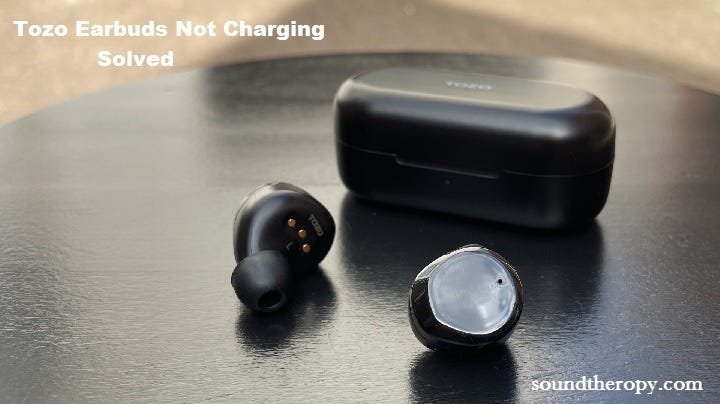
The most common reason for tozo earbuds not charging is a buildup of debris on the metal contact points, which prevents the case from completing the electrical circuit. If the case itself doesn’t have a charge, or if the earbuds aren’t seated perfectly, the power transfer will fail. You should first inspect the small gold pins inside the charging case and the corresponding contact points on the earbuds for any signs of dust or earwax. Gently wiping these surfaces with a dry cotton swab often restores the connection instantly.
Troubleshooting Tozo earbuds not charging
| Cause | How common | How to confirm it | Fix it yourself? |
|---|---|---|---|
| Dirty contact points | Most of the time | Look for debris | Yes |
| Case battery empty | Common | No lights on case | Yes |
| Earbuds misplaced | Common | No magnetic snap | Yes |
| Faulty power cable | Occasional | Try different cable | Yes |
| Software glitch | Occasional | Reset the device | Yes |
| Internal hardware failure | Rare | No reaction to reset | No |
Build up on the metal contacts
Debris on the charging pins acts as an insulator, blocking the flow of electricity between the case and the earbud. Even a thin layer of skin oil or earwax can stop the device from detecting the charge. This is the first thing to check because it requires no tools and takes only a few seconds to resolve. If you see dark spots or a film on the gold pins inside the case, they likely need a light cleaning.
To fix this, take a dry cotton swab and gently rub the gold pins inside the case. Don’t use water or liquid cleaners, as moisture can damage the delicate internal circuits. If you’re struggling to remove hardened material, you can use a clean, soft-bristled brush to nudge the debris away. You must be very careful not to bend the pins, as they’re spring-loaded and easily damaged. Once the pins look shiny and clean, repeat the process on the small contact pads found on the bottom of the earbuds. After cleaning, place the earbuds firmly back into their slots. If the LED lights on the case don’t blink to indicate charging, press down on the earbuds slightly to ensure they’re making solid contact. If you find the pins are bent or pushed deep into the plastic housing, this is a sign of physical damage that can’t be repaired at home. Always check the official TOZO support page for specific guidance on how your model indicates a successful charge, as light patterns vary by model.
Power delivery and battery status
The charging case often sits empty without the user noticing, leading to the false belief that the earbuds are broken. A case that has been sitting unused for a few weeks may have drained its battery completely. You can tell if this is the issue by observing the indicator lights on the front or side of the charging case when you plug it into a power source.
If the case shows no light when plugged into a wall adapter, the problem lies with the power source rather than the earbuds. First, swap the USB cable for one you know works with another device. If that doesn’t help, try a different wall brick or a USB port on a computer. Never use a high-voltage fast charger, as this can sometimes cause the internal protection circuit to trip or fail. If you’re using a wireless charging pad, ensure the case is centered exactly on the coil, as even a small shift can stop the induction process. If the case still shows no signs of life after 30 minutes of being plugged into a verified power source, the battery inside the case may have reached the end of its functional life. This varies by model — check the label on the bottom of the case to identify your specific version, then look up its expected battery performance in the manual.
Incorrect placement in the case
Earbuds must sit in a specific orientation to engage the charging pins, and if they’re slightly off-center, they won’t charge. Most users make the mistake of dropping the buds in too quickly without waiting for the magnetic “snap” that indicates they’re locked in position. You can confirm this cause if you notice the earbuds resting at an angle or if you don’t see the standard charging light sequence when you close the lid.
If the magnets don’t pull the earbud into place, check for any obstruction in the charging slot, such as a large silicone ear tip that’s folded over. Sometimes, a third-party ear tip is too thick and prevents the earbud from sitting deep enough to touch the pins. To fix this, remove the rubber tip and try charging the earbud “naked” to see if it makes a connection. If it works, you know the tip was the barrier. If you must use larger tips for a better fit, ensure you press the earbud down firmly until the internal magnet clicks. This is a common trade-off; you get a better seal in your ear, but you must be more precise when putting them away. If you still can’t get a light, try wiggling the earbud slightly while it’s in the slot. If it flickers to life, the internal spring-loaded pin in the case may be sticking.
The less likely causes
- Software hang: A temporary error in the Bluetooth firmware can stop the earbuds from recognizing they’re in the case, which you can fix by performing a factory reset according to your manual.
- Corroded pins: If you live in a humid area, the gold pins may develop a layer of oxidation that needs a professional cleaning service or replacement.
- Damaged charging port: If the USB-C or Micro-USB port on the case feels loose or wobbly when you plug in the cable, the internal solder joint may have broken.
- Internal battery failure: If the case holds a charge but the earbuds do not, the internal battery of the earbud itself might be dead, which requires a technician to open the unit.
- Circuit board short: If the case was dropped or exposed to liquid, the internal motherboard might have shorted out, which is a non-repairable condition for the average user.
What a fix usually involves
Fixing these issues usually involves basic maintenance or replacing a minor accessory. Cleaning the pins takes only a few minutes and costs nothing, provided you have basic household items like cotton swabs. If the charging cable is the culprit, replacing it with a standard USB cable is a small expense that’s easy to manage. If the issue is the charging case battery or the internal circuitry, the fix becomes much more involved. In these cases, you’re likely looking at the cost of a replacement case, which is often a significant portion of the price of a new set of earbuds. Before you decide to buy a new case or a full replacement, check the manufacturer’s warranty terms to see if your specific model is covered for hardware defects. You can find the contact details for the brand’s support team on the back of the original packaging or through their official website to request a quote or a warranty claim.
Frequently asked questions
Can I use a phone charger to charge my TOZO earbuds?
Yes, you can use a standard phone wall adapter, but ensure it provides a steady output; if you suspect an issue with the power delivery, have a technician test the electrical output instead of attempting it yourself.
How long does it take for TOZO earbuds to fully charge?
About 1 to 2 hours is the standard time for a full charge from empty. This assumes you’re using a cable that isn’t damaged and a power source that meets the manufacturer’s requirements. If the case also needs charging, allow for extra time, as the total energy required depends on the current state of both the earbuds and the case battery.
Is it safe to leave my earbuds in the charging case all the time?
Yes, it’s safe to leave them in the case because the charging circuit is designed to stop once the battery reaches full capacity. Modern lithium-ion batteries have built-in protection to prevent overcharging. However, if you don’t plan to use the earbuds for several weeks, it’s better to store them with a partial charge rather than keeping them plugged into a wall.
Why do my earbuds only charge when the case is plugged in?
This usually means the battery inside your charging case has failed and can’t hold a charge on its own. The case acts as a power bank, so if it can’t store energy, it can’t pass that energy to the earbuds unless it’s connected to a live power source. Check the case lights to see if they stay on after you unplug the unit.
How do I know if my earbuds are actually charging?
Check the user manual for your specific product to understand what the LED indicator lights on the case mean, as every model has a different light pattern.
What happens if I use a damaged charging cable?
It may lead to intermittent charging or no charging at all, and in some cases, it could potentially damage the charging port. A frayed cable or a bent connector can cause electrical shorts that may trip the internal protection circuits of the case. If your cable shows any signs of wear, such as exposed wires or a loose connector, stop using it immediately and switch to a new one.
Final Thoughts
If these simple fixes don’t get your music playing again, don’t worry. It’s possible the internal battery has simply reached the end of its life. Reach out to the manufacturer’s support team through their website; they’ll help you determine if your device is still covered under their warranty for a replacement.
Related guides